⚡ Text Quick Viewer
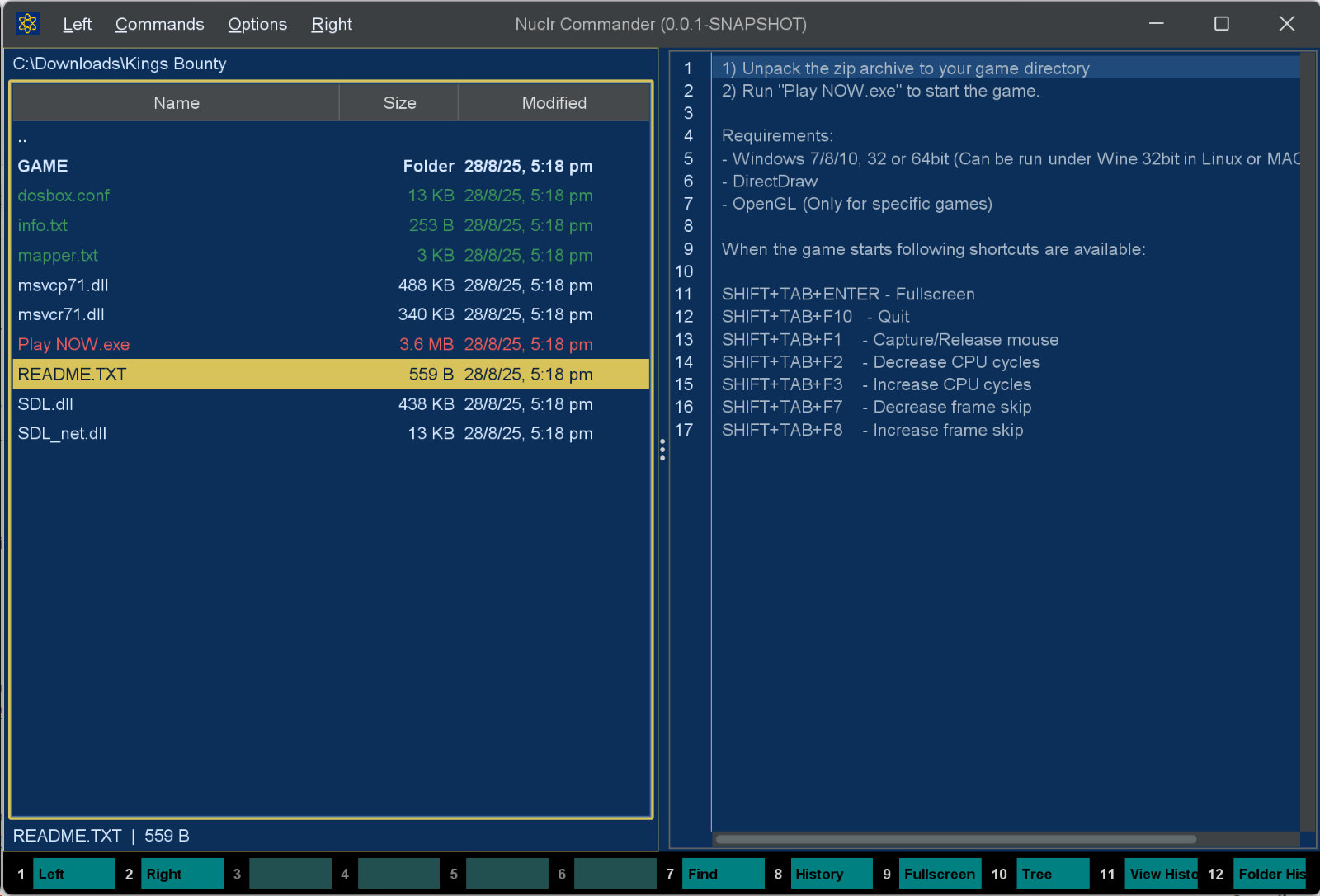
Syntax-highlighted instant previews for text and source files inside Nuclr Commander.
No tab switching. No app hopping. Just hit Ctrl+Q and get the file in front of you, fast. 😎
🚀 What It Does
- 🔥 Syntax highlighting for 50+ languages and formats via RSyntaxTextArea
- 🧭 Line numbers for quick scanning and reference
- 🪄 Code folding where the language supports it
- 🌑 Dark styling that fits Commander without looking bolted on
- 🛡️ Large-file guard that stops previews over 10 MB from freezing the UI
- 🧪 Binary-file detection that quietly skips files that should not be rendered as text
- 📦 NIO.2 support, including files inside ZIP and JAR archives
- ⛔ Cancellation-aware loading so switching files does not leave stale content behind
🎯 Supported File Types
| Category | Extensions |
|---|---|
| Plain text | txt, log, csv, md |
| Web | html, htm, css, js, mjs, ts, tsx, jsp |
| Data / config | json, yaml, yml, toml, ini, conf, cfg, properties, prefs, pref |
| JVM | java, kt, scala, groovy, gradle |
| Systems | c, cpp, h, hpp, cs, go, rs |
| Scripting | py, rb, php, lua, perl, pl, dart, sql |
| Shell / scripts | sh, bash, bat, cmd, ps1 |
| XML / markup | xml, svg, html, htm, jsp, csproj, classpath, project, factorypath |
| IDE / project | vsconfig, firebaserc |
| Extensionless names | LICENSE, WHATSNEW, Dockerfile, mvnw, .gitignore, .gitattributes, .meta |
Files that match none of the above are still previewed when they look like text: the first 8 KB is decoded as UTF-8 and accepted only if it has no NUL bytes, matches no known binary signature, is at least 85 % printable, and is no more than 60 % whitespace. A #! shebang also qualifies a file, which is how extensionless scripts preview correctly.
🖼️ Thumbnail
The head of the file (16 KB) as a page of monospaced text; binary content has no thumbnail. At icon sizes the lines are drawn as grey bars, the way a document preview looks.
It implements the platform SDK 6.0.0 thumbnail methods, so plugins that want a picture of a file - attachment chips in AI Projects, for one - get it through Commander.
📥 Installation
Copy the signed plugin archive and detached signature into the Nuclr Commander plugins/ directory:
quick-view-text-<version>.zip
quick-view-text-<version>.zip.sig
Nuclr Commander verifies the RSA-SHA256 signature against nuclr-cert.pem on load. The plugin becomes available immediately without a restart.
🧠 How It Works
TextQuickViewProvider  → decides whether a file looks like supported text
TextFileSupport        → extension/filename tables, binary + UTF-8 heuristics, syntax mapping
TextQuickViewPanel     → loads content and renders it in RSyntaxTextArea
Loading flow
supports(resource)matches the filename or extension; anything unknown falls through to the 8 KB text heuristic inTextFileSupport.openResource(resource, cancelled)delegates toTextQuickViewPanel.load(...)on a virtual thread.- Loading performs:
- file-size guard (10 MB limit)
- binary scan of the first 8 KB
- content read via
PathorInputStream - EDT handoff for final UI update
setText(...)selects the syntax style (by extension, or by filename for things likeDockerfile) and swaps in a fresh document.
Threading model
- EDT: Swing updates, document swaps, repainting
- Virtual thread: file I/O and binary detection
AtomicBoolean cancelled: prevents stale UI updates when the user changes selection mid-load
🗂️ Source Layout
src/main/java/dev/nuclr/plugin/core/quick/viewer/text/
├── TextQuickViewProvider.java   plugin entry point
├── TextFileSupport.java         format detection, binary/text heuristics, syntax mapping
└── TextQuickViewPanel.java      Swing panel, loading, syntax highlighting
Unit tests for the detection heuristics live in src/test/java/.../TextFileSupportTest.java.
📚 Dependencies
| Library | Version | Purpose |
|---|---|---|
dev.nuclr:platform-sdk | 6.0.0 | Nuclr platform interfaces |
rsyntaxtextarea | 3.6.1 | Syntax-highlighted text rendering |
📄 License
Apache 2.0. See LICENSE.