📄 PDF Quick Viewer
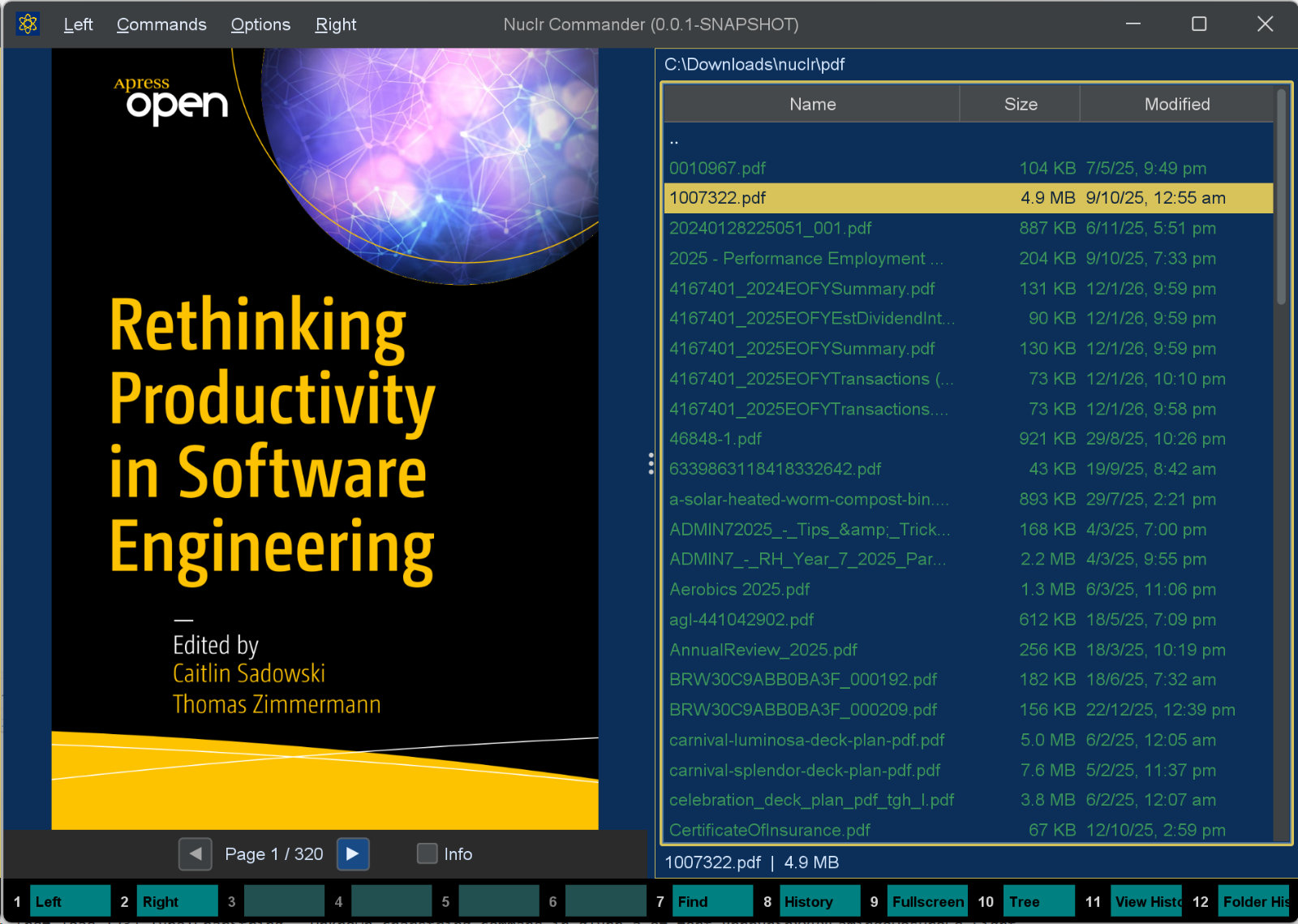
A Nuclr Commander plugin that renders PDF files directly in the quick-view panel. Press Ctrl+Q on any .pdf file to preview it without leaving the file manager.
🖼️ Preview
✨ Features
- Page-accurate rendering — every page is rasterized to a crisp RGB image via Apache PDFBox
- Page navigation — move between pages with on-screen buttons, keyboard shortcuts, or a direct page-number jump
- Zoom & pan —
Ctrl+scroll zooms with the page point under the cursor anchored; drag to pan when zoomed. Zoom and pan reset on every page change - Info overlay — semi-transparent HUD showing title, author, page count, PDF version, and render DPI
- LRU page cache — recently viewed pages are kept in memory so navigation feels instant
- Cancellation-aware — switching files mid-render immediately aborts the in-flight job; no stale frames ever reach the UI
- Encrypted PDF handling — password-protected files display a clear message instead of crashing
- JBIG2 support — bundled
jbig2-imageioallows PDFBox to render scanned PDFs that use JBIG2-compressed images - Optional CLI backends — can delegate rendering to MuPDF, Poppler, or Ghostscript when installed; falls back to PDFBox automatically on any failure
- Persistent settings — DPI, overlay toggle, and backend choice survive restarts
⌨️ Keyboard Shortcuts
| Key | Action |
|---|---|
← / ↑ / Page Up | Previous page |
→ / ↓ / Page Down | Next page |
Home | First page |
End | Last page |
Ctrl+G | Prompt for a page number and jump within the valid range |
Ctrl + scroll | Zoom in / out |
| Mouse drag | Pan (only when zoomed in) |
The quick-view panel must have focus for keyboard shortcuts to work. Click the panel or press Ctrl+Q to focus it.
⚙️ Settings
Settings are stored as a plain .properties file in the platform config directory:
| Platform | Path |
|---|---|
| Windows | %APPDATA%\nuclr\pdf-quick-viewer.properties |
| macOS | ~/Library/Application Support/nuclr/pdf-quick-viewer.properties |
| Linux | $XDG_CONFIG_HOME/nuclr/pdf-quick-viewer.properties (or ~/.config/nuclr/) |
| Key | Default | Description |
|---|---|---|
pdf.quickView.dpi | 144 | Render resolution. Range: 36–200. |
pdf.quickView.cachePages | 10 | Maximum rendered pages in the LRU cache. |
pdf.quickView.showInfoOverlay | true | Show the semi-transparent info panel. |
pdf.quickView.backend | PDFBOX | Rendering backend (see table below). |
🔌 Backends
| Value | Description |
|---|---|
PDFBOX | Apache PDFBox — pure Java, always available. Recommended. |
AUTO | Try CLI tools in order (MuPDF → Poppler → Ghostscript); fall back to PDFBox. |
CLI_MuTool | MuPDF mutool draw. Requires mutool on PATH. |
CLI_POPPLER | Poppler pdftocairo or pdftoppm. Requires Poppler on PATH. |
CLI_GS | Ghostscript gs. Requires Ghostscript on PATH. |
🖼️ Thumbnail
The first page, rendered by PDFBox at the scale that fits the box, honouring page rotation. It is always PDFBox, whichever backend the panel uses, and a document of its own, so a thumbnail never touches the PDF on screen. An encrypted PDF has no thumbnail.
It implements the platform SDK 6.0.0 thumbnail methods, so plugins that want a picture of a file - attachment chips in AI Projects, for one - get it through Commander.
📥 Installation
Copy the signed plugin archive and detached signature into the Nuclr Commander plugins/ directory:
quick-view-pdf-<version>.zip
quick-view-pdf-<version>.zip.sig
Nuclr Commander verifies the RSA-SHA256 signature against nuclr-cert.pem on load. The plugin becomes available immediately without a restart.
🧱 Architecture
PdfQuickViewProvider          implements QuickViewNuclrPlugin
└── PdfQuickViewPanel         Swing JPanel — all state is EDT-only
    └── PdfRenderService      virtual-thread orchestrator
        ├── PdfPageCache      thread-safe LRU (LinkedHashMap, access-order)
        ├── PdfSettings       singleton — java.util.Properties persistence
        └── backend/
            ├── PdfRenderBackend   strategy interface
            ├── PdfboxBackend      Apache PDFBox 3.x (default)
            └── CliBackend         MuPDF / Poppler / Ghostscript
🧵 Threading model
- EDT — UI state reads/writes, Swing repaints, button callbacks
- Virtual threads (
Thread.ofVirtual()) — byte reading, document opening, page rendering - Cancellation — a monotonic
AtomicLongepoch is incremented on every new request; stale results are silently discarded - Backend lock — a
ReentrantLockserializesopenDocumentandrenderPageto prevent concurrent access to a non-thread-safePDFRenderer
📚 Dependencies
| Library | Version | Purpose |
|---|---|---|
dev.nuclr:platform-sdk | 6.0.0 | Nuclr platform interfaces |
pdfbox | 3.0.7 | PDF rendering (Apache PDFBox) |
pdfbox-io | 3.0.7 | PDFBox I/O utilities |
fontbox | 3.0.7 | Font handling for PDFBox |
commons-logging | 1.3.5 | Logging bridge |
jbig2-imageio | 3.0.4 | JBIG2-compressed image support |
📜 License
Apache 2.0 — see LICENSE.